FaraClinic
Built on FaraERP

From first booking to the books, in one system

Online booking, deposits, reception, the waiting-room display, cashier, bank reconciliation and accounting all work as one. Whatever reception enters flows on to the cashier and the books, with no one typing it in twice.

  • Online and phone booking
  • Waiting-room queue display
  • Cashier and bank matching
  • Confirmation and reminder SMS
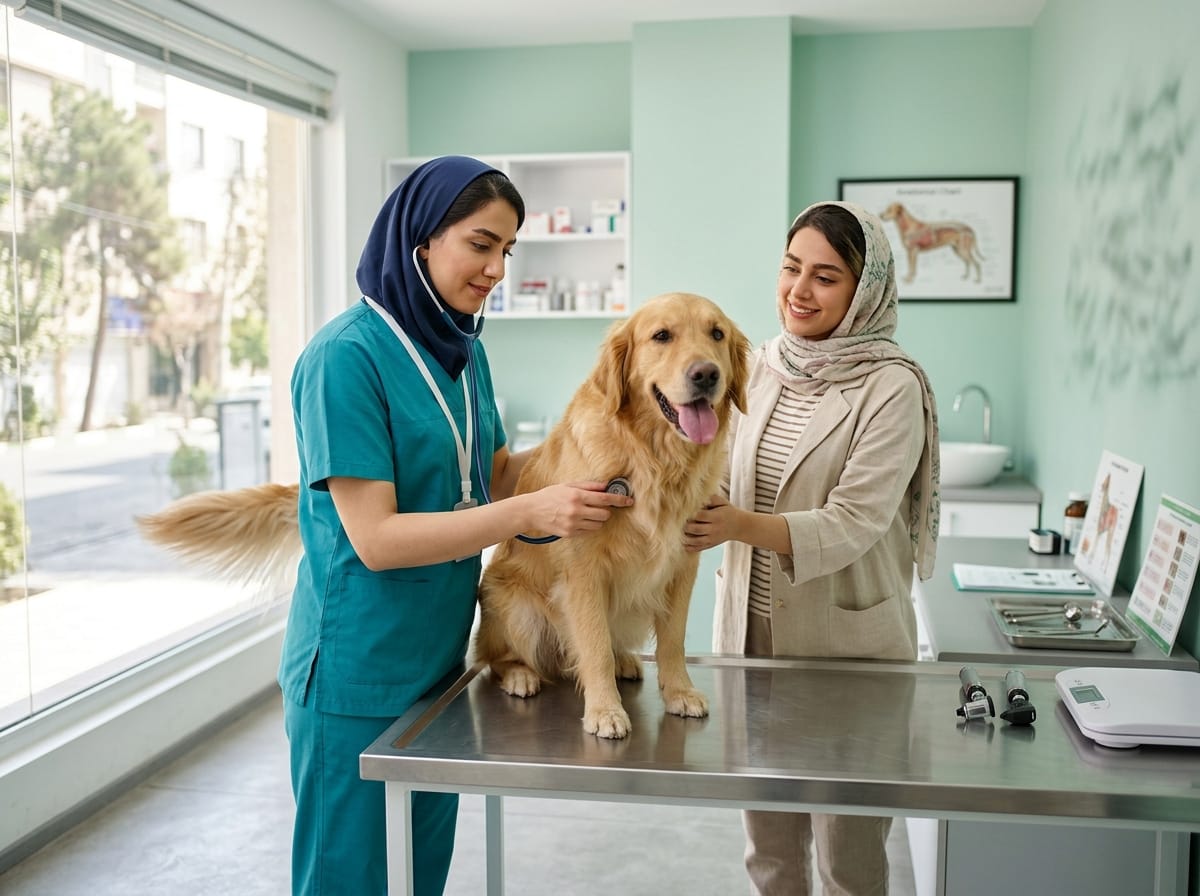
A bright, calm clinic reception where a receptionist in a teal headscarf and white coat smiles at a patient
Ticket 14 — Room 2On the waiting-room screen, announced aloud
Deposit matched to the bank statementOnce the cashier confirms, the voucher is posted

stats

5
booking channelsOnline, phone, walk-in, next appointment and admin entry, each switched on or off in the scheduling policy.
3
ways to match a receiptBy tracking number, by card digits plus time, or by payer name plus time.
+30/+60
minute SMS retriesA message that fails stays in the queue and is retried after 30 and again after 60 minutes.
12
payment gateways ready to connectFrom Saman and Mellat to ZarinPal and Zibal, for when you want online deposits through a gateway.
Who it is for

For every centre that sees patients

From a single practice to a polyclinic, a hospital's outpatient side or a veterinary clinic. The core is the same; you switch on only the parts you need.

A specialist listens closely to a middle-aged patient in a bright consultation room🩺 Clinics & practices

Specialist clinics and practices

Doctors and front-desk staff should spend their time on patients, not on the appointment book and the end-of-day tally. FaraClinic takes the repetitive work off the front desk.

  • Online and phone booking with your own slot length, buffers and a daily cap per doctor
  • Card-to-card deposits, with the receipt checked by AI
  • Confirmation and reminder SMS, never more than one message per visit
  • Several services in one admission, such as a consultation, ECG and echo together
  • The next appointment in 1, 3 or 6 months, picked on a Jalali calendar
Ask about your centre
A day at the clinic

One patient, from first call to the ledger

This is the flow FaraERP runs from start to finish, each step handing its data to the next. It extends the deposit-and-receipt flow already being rolled out at a skin and beauty clinic.

  1. PatientBooking

    Booking

    The patient books on the clinic's website or the book.clinicpanel.ir marketplace, by phone or at the desk. Only slots the scheduling policy allows are offered, honouring slot length, buffers, lead time, daily caps and Iranian public holidays.

  2. PatientBooking deposit

    Paying the deposit

    The patient pays card-to-card and uploads the receipt. AI flags a short amount, the wrong destination card or a receipt used before, and the staff confirmer gets an SMS; a bank gateway can be connected instead.

  3. SystemAppointment SMS

    Confirmation and reminder

    A confirmation goes out, then a reminder a set number of hours or days before. Numbers without an SMS account get it on WhatsApp, and failed sends are retried after 30 and 60 minutes.

  4. ReceptionAdmission

    Reception

    The patient file opens with national ID or passport, age or date of birth, blood type, allergies, height, weight and record number. Several services go on one admission, prices follow the practitioner's grade, and an admission code is printed.

  5. ReceptionQueue display

    Queue and call

    Reception or the doctor calls the patient to a room and the waiting-room screen updates instantly. The call is read aloud by an AI voice, which receives only the name, gender and room number.

  6. DoctorRequested services

    In the consulting room

    If the doctor orders another service, it appears on the reception screen at once, with a pay button. The patient goes straight to the cashier, and no slip of paper changes hands.

  7. DoctorService consumables

    Consumables

    Each service carries its default consumables and the quantity included in the price; the doctor adjusts them for this patient and any extra is billed. The usage becomes a warehouse request with approval and an SMS delivery code.

  8. CashierReception cashier

    Cashier

    Payment is taken in cash, on the card reader or into the bank account. Refunds, voids and receipt printing live on the same screen, and each method's total is ready at the end of the day.

  9. AccountsReceipt-to-bank matching

    Bank reconciliation

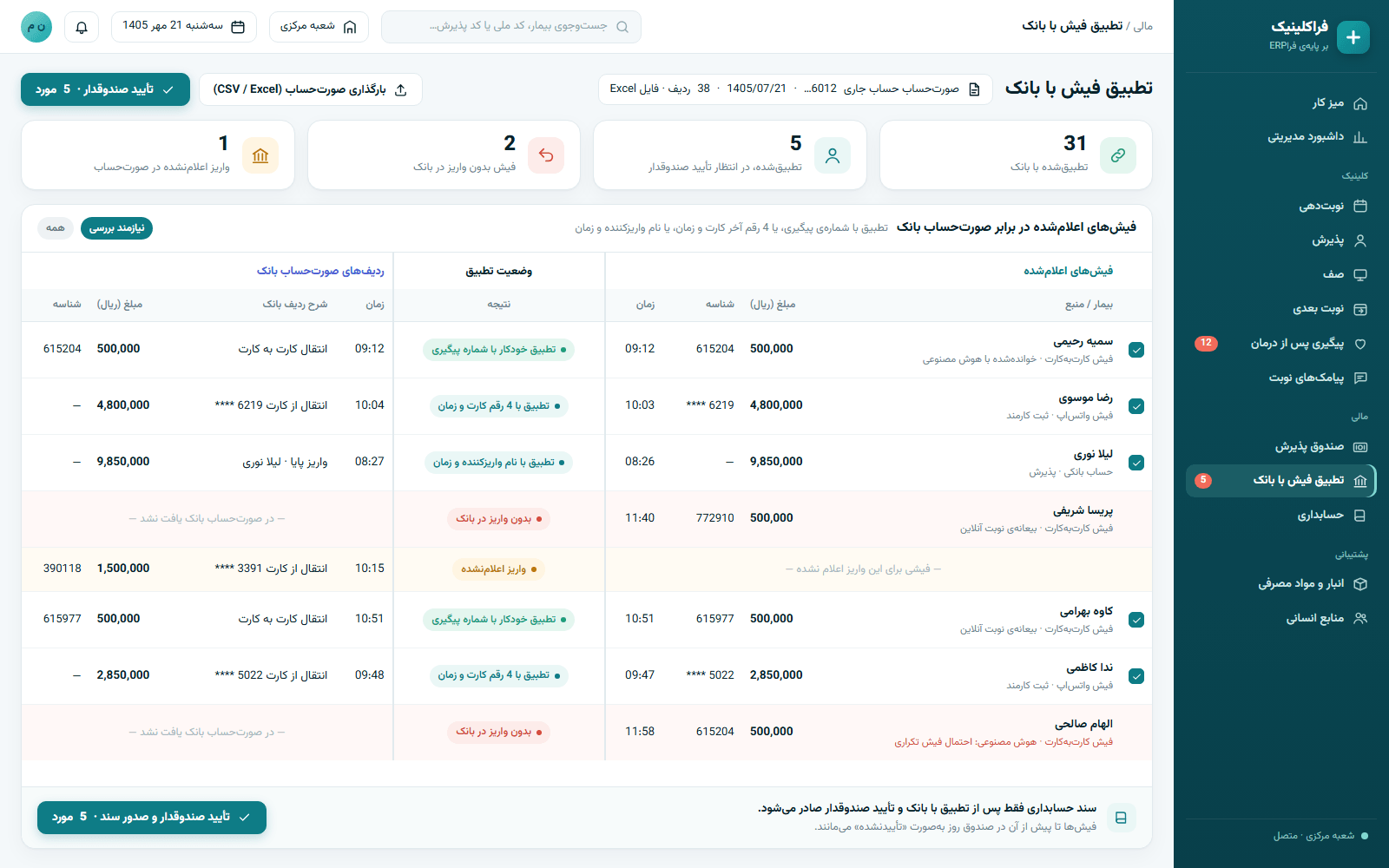
    The bank statement is imported as CSV or Excel and each receipt is matched by tracking number, card digits and time, or payer name and time. Receipts with no deposit and deposits with no receipt are flagged separately.

  10. AccountsAccounting

    Accounting entry

    A deposit is posted only after the bank match and the cashier's confirmation, and revenue is posted when the service is completed. A ready clinic chart of accounts and a Simple mode keep it light for small centres.

  11. ReceptionPost-treatment follow-up

    Next visit and follow-up

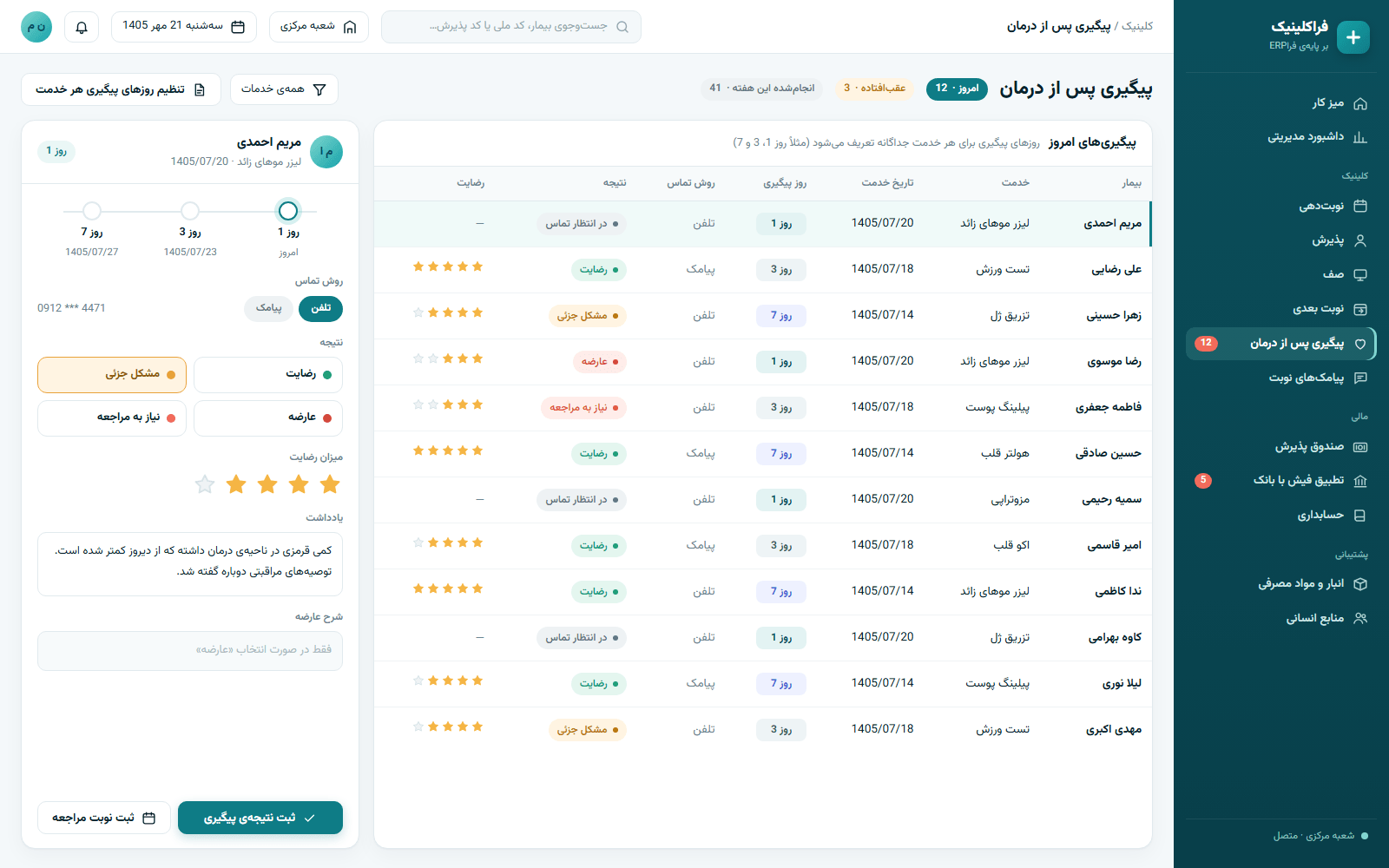
    The next appointment is one tap away, 1, 3 or 6 months out, or picked on the Jalali calendar. Follow-up calls on set days, such as day 1, 3 and 7, record the outcome, satisfaction and any complications.

  12. ManagerExecutive dashboard

    The manager's view

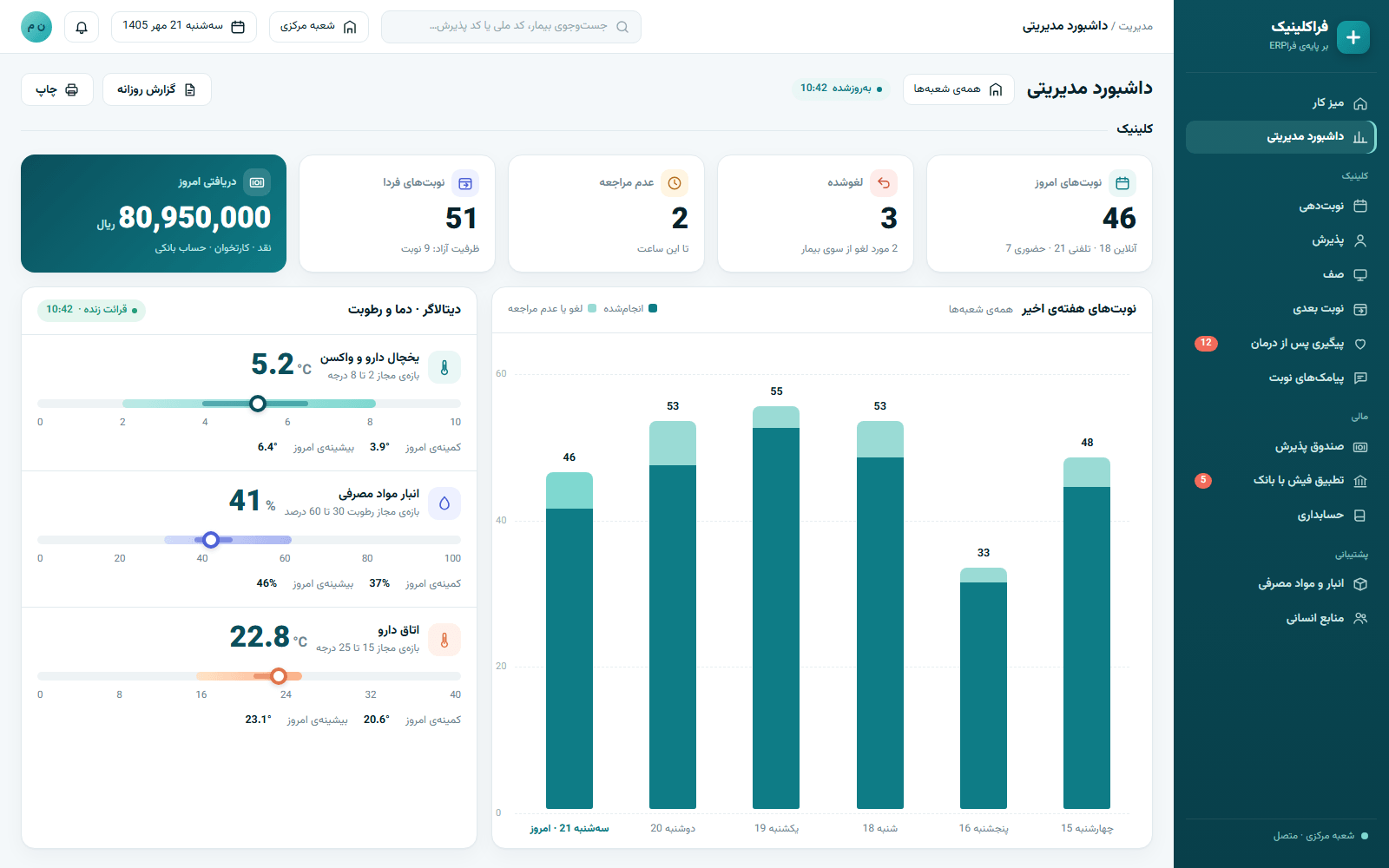
    The dashboard shows today's bookings, cancellations, no-shows, tomorrow's list and today's takings. Daily reports, branches, HR, purchasing and stock sit in the same system.

Features

The screens you will use every day

Six screens that carry most of a medical centre's daily workload, all in the web panel, on the reception PC or the manager's phone.

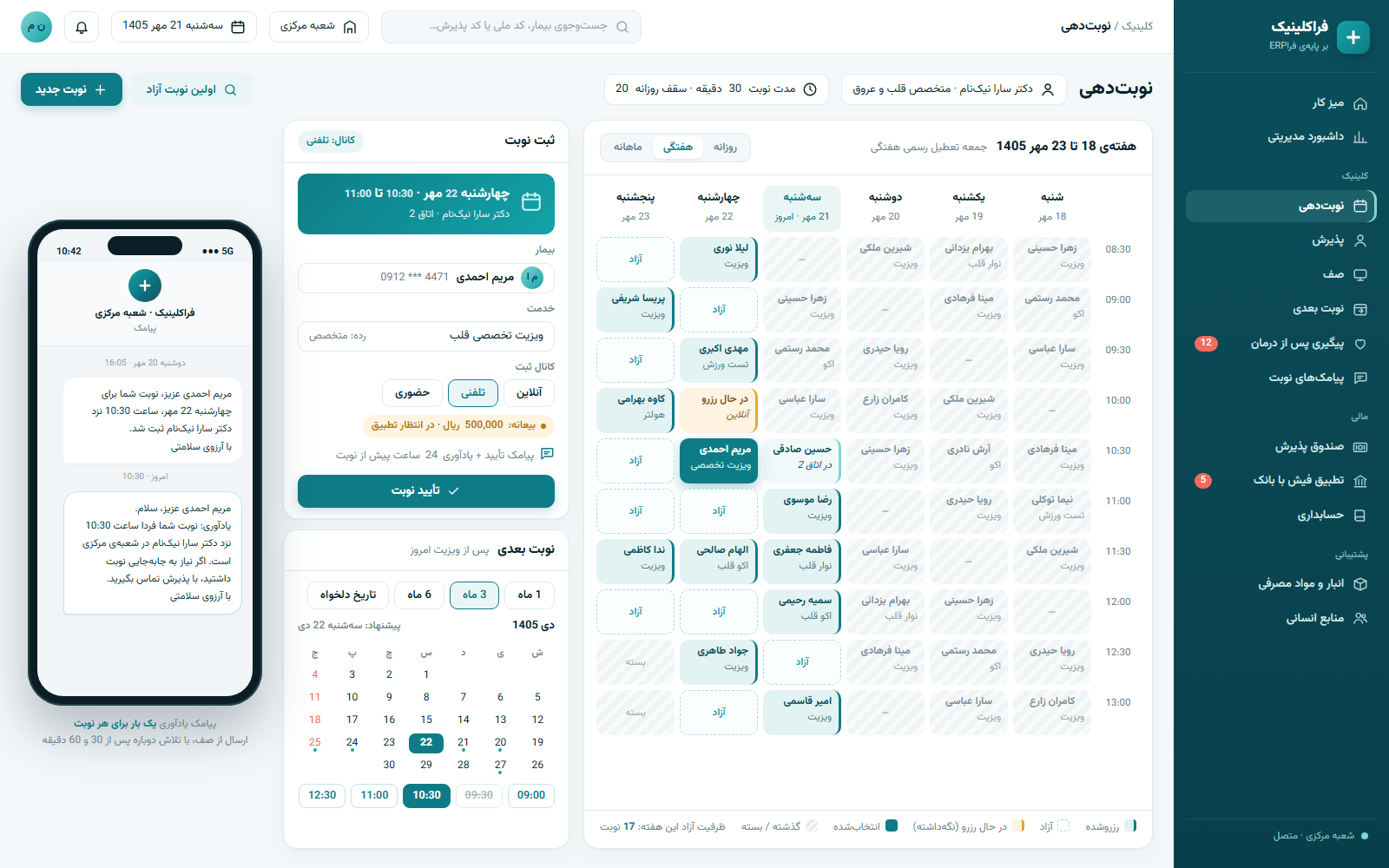
FaraClinic booking screen: a doctor’s weekly slot view with free and booked slots, a booking panel with a 500,000-rial deposit, next-appointment chips for 1, 3 or 6 months with a Jalali calendar for Dey 1405, and a phone showing a reminder SMS for tomorrow at 10:30
Booking Live in a clinic

Booking that knows your clinic's rules

Set a policy per branch, service or practitioner, and the system offers only the times that fit it.

  • Fixed slots or queue numbers; slot length, buffers, concurrent capacity and an overbooking percentage
  • Daily caps per doctor, a booking horizon and a cancellation cutoff
  • A slot is held until confirmed, so the same time can never be booked twice
  • A first-free-slot finder and a monthly availability heatmap
  • Iranian public holidays and weekly days off built in
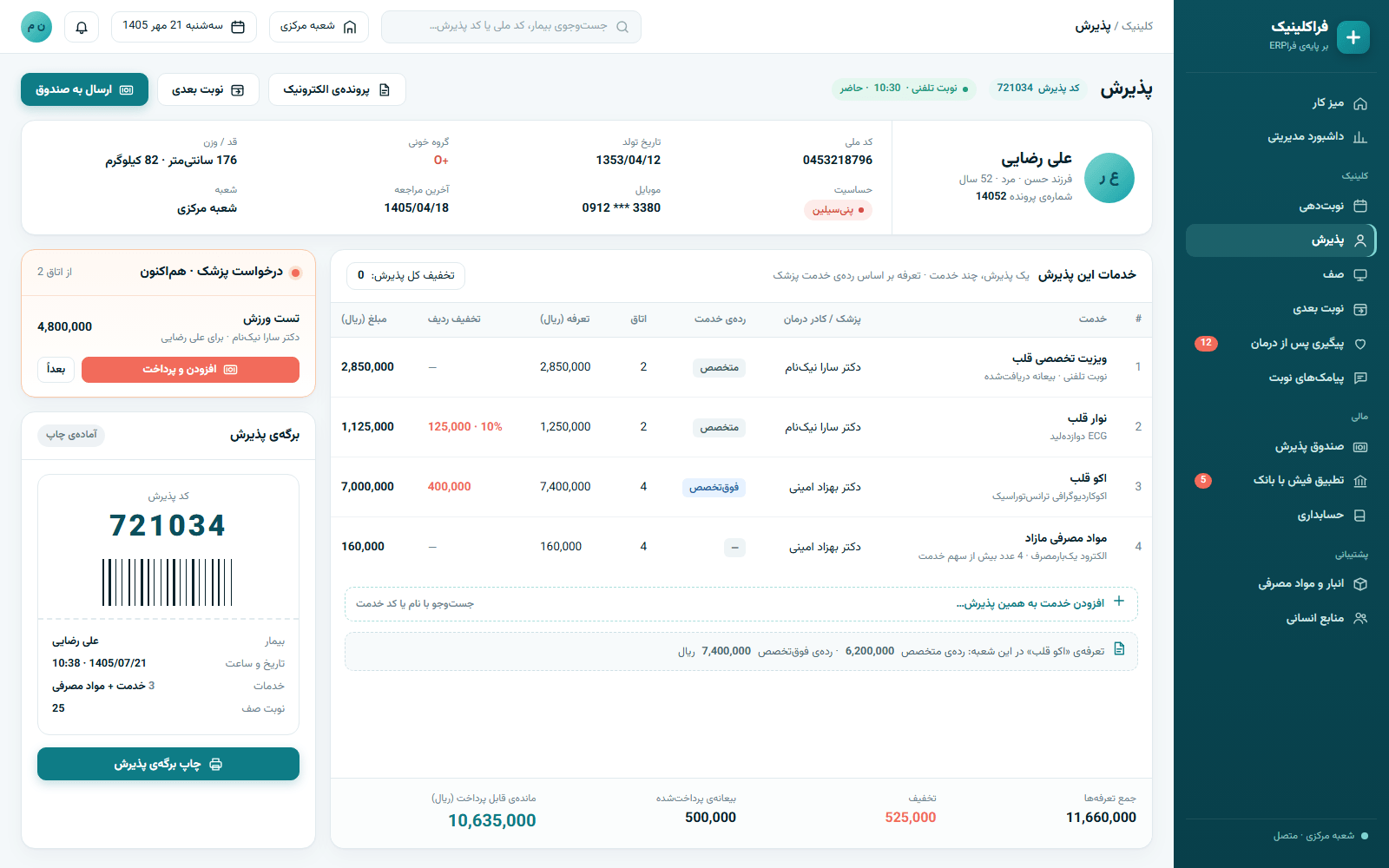
Reception screen: a patient file with national ID, age 52, blood type O+ and a penicillin allergy; one visit holding a consultation, ECG and echo priced by practitioner grade, per-row discounts, extra consumables, totals and a printable admission slip with code 721034
Reception Live in a clinic

One admission for everything in a visit

Patient file, services, prices and discounts sit side by side, so each admission takes moments.

  • A file with national ID, or passport for foreign nationals, father's name, age or date of birth, blood type, allergies, height and weight
  • Several services in one admission, each priced by the practitioner's grade
  • Discounts per line or on the whole admission, plus free services
  • Branch-specific services and a printable admission code
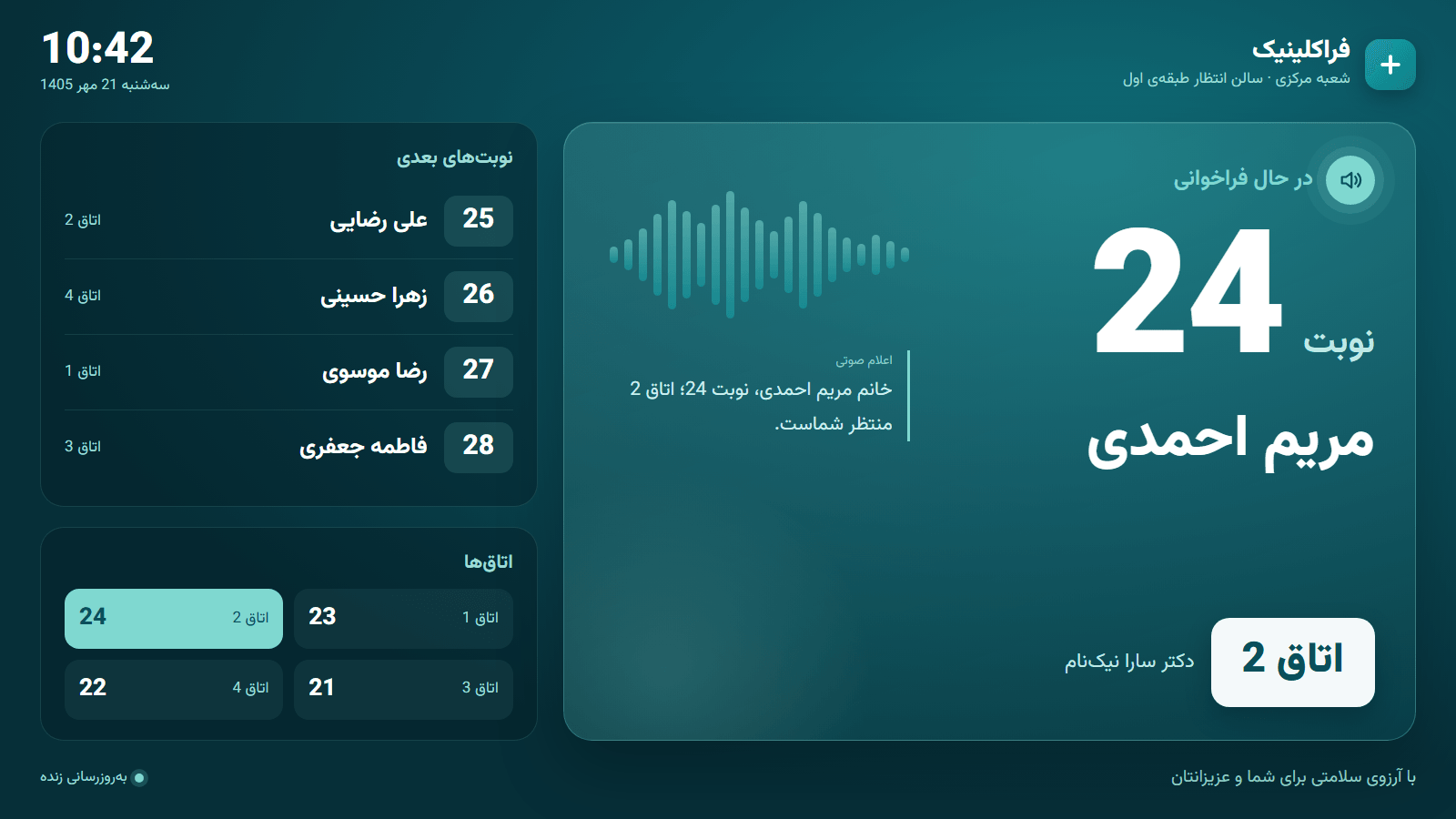
Waiting-room queue display on dark teal: now calling number 24, Maryam Ahmadi, room 2, with a voice-announcement icon, the next numbers, room status, the clock and the Central branch name
Queue display Live in a clinic

A calmer waiting room

Instead of asking the front desk again, patients see and hear their turn and room on the TV.

  • Call to a room, send back to the waiting list, or reassign to another doctor
  • A display account locked to its own branch, updating in real time
  • AI writes the announcement and voices it in a female or male voice; the browser's own voice steps in if it is unavailable
  • Only the name, gender and room number are sent to build the announcement
Bank reconciliation screen: declared receipts against bank statement lines, with statuses for automatic match by tracking number, match by last 4 card digits and time, no deposit in the bank and undeclared deposit, plus a cashier-confirm button; the voucher is issued only after confirmation
Cashier and reconciliation Cashier live

The money on the books is the money in the bank

The cashier records every payment, and reconciliation makes sure each card-to-card receipt really arrived before anything is posted.

  • Cash, card reader and bank account; refunds, voids and receipt printing
  • Session balance, a daily journal and totals per payment method
  • AI reading of card-to-card receipts
  • CSV or Excel bank statement import that flags receipts with no deposit and deposits nobody declared
  • Vouchers posted only after the bank match and the cashier's confirmation
Executive dashboard: cards for today’s bookings, cancellations, no-shows, tomorrow’s bookings and today’s payments, a bar chart of the past week’s bookings, and a datalogger panel with temperature and humidity against their allowed ranges and the day’s min and max
Executive dashboard Part of FaraERP

Today at the clinic, at a glance

Without phoning the front desk, the manager knows today's bookings, who did not turn up and what has been taken.

  • Today's bookings, cancellations, no-shows and tomorrow's appointments
  • Today's takings alongside the rest of the organisation's figures
  • Live temperature and humidity from a datalogger in the medicine fridge or store, against its allowed range
  • Daily reports and separate opening hours for each branch
After-treatment follow-up screen: follow-ups due on day 1, 3 and 7 after a service, with outcomes (satisfied, minor issue, complication, needs a visit) and star satisfaction scores
Post-treatment follow-up Ready to use

Patients are not forgotten once they leave

Decide for each service how many days later to follow up, and every call's outcome stays on file.

  • Follow-up days for each service, such as day 1, 3 and 7
  • Contact method and outcome: satisfied, minor issue, complication, needs a visit
  • A satisfaction score and notes on complications
  • The next appointment in 1, 3 or 6 months on a Jalali calendar
Modules

Everything a medical centre needs, on one database

The clinical front and the finance and admin back office are one system, so reception, cashier, stock and accounts all see the same numbers.

Booking and scheduling

Scheduling policies per branch, service and doctor, holidays included.

Reception and patient file

Identity and basic medical details, multi-service admissions, admission codes.

Queue and waiting-room display

Calls to rooms, a live screen and spoken announcements.

Electronic record

Configurable, validated fields plus files and images; not a full EHR.

Service consumables

Default usage per service, extra units billed, a stock request raised.

Reception cashier

Cash, card reader and bank account, with refunds, voids and per-method totals.

Booking deposits

Card-to-card receipts checked by AI, or a payment gateway you can connect.

Receipt-to-bank reconciliation

Import the bank statement and match it to receipts automatically.

Accounting

A clinic chart of accounts, automatic revenue vouchers and a Simple mode.

Appointment SMS and WhatsApp

Welcome, confirmation, reminder, cancellation and reschedule messages, paid from the wallet.

Booking marketplace

Your clinic's profile on book.clinicpanel.ir, showing the services you choose.

Clinic website

A site run from the CMS: services, articles, FAQ and online booking.

Post-treatment follow-up

Calls on set days, recording outcome, satisfaction and complications.

Stock and purchasing

Batch and expiry tracking, with AI reading of purchase invoices.

HR and payroll

Staff files, payroll, statutory insurance and tax lists, and attendance.

Office automation

Letters, document workflow and electronic filing.

Executive dashboard

Today at the clinic next to the rest of the organisation.

Temperature and humidity logger

Live readings for medicine fridges and stores, against set ranges.

Where it runs

Fewer claims, real work

Instead of glossy numbers and badges, here are the centres that have put FaraClinic to work, and exactly what they use.

Live

Dr Shafiee's Cardiology Clinic

Booking, reception, the waiting-room queue display, the cashier and appointment SMS, in the clinic's everyday work.

Onboarding

Dr Ladan Parsa's Skin & Beauty Clinic

Its own installation is in place, and onboarding starts with the deposit flow: recording card-to-card receipts, reading them with AI and matching them to the bank statement.

Built by AHP, the team behind FaraERP

The same team that builds FaraERP. Accounting, stock, HR and the clinical screens come from one codebase and one database, not from several programs stitched together.

Your data, on your own installation

Every centre has its own installation and its own database, on the centre's own server or on ours inside Iran.

Getting started

From the first conversation to your first live day

We take onboarding one step at a time, alongside you; how quickly it goes depends on the size of your centre and how ready your team is.

  1. Conversation and demo

    Step 1

    We listen to how your centre works today and show you that same flow in the demo, from booking to cashier to ledger.

  2. Your own installation

    Step 2

    Your installation and database are set up on your server or ours in Iran, with only the modules you need switched on.

  3. Setting up your centre

    Step 3

    Branches, rooms, doctors, services and prices, scheduling policies, payment methods and message texts are set up together.

  4. Training for each role

    Step 4

    Reception, cashier, doctors, accounts and management each learn the screens they will use.

  5. Go-live and support

    Step 5

    We stay close through the first days so the new way of working settles in and any snag is sorted on the spot.

FAQ

Questions people usually ask

Straight answers: what is there today and what is not yet.

Not today. Insurer contracts and tariffs, co-payments, claims, links to Tamin, Salamat or SEPAS, and e-prescribing are not built into FaraClinic. If your centre needs them, say so in your demo request so we know exactly what matters to you.

Not today. Inpatient admission, wards and beds are not part of FaraClinic. For hospitals we cover outpatient and para-clinical reception, queueing and cashier, plus the back office: accounting, treasury, stock and purchasing, HR and payroll, attendance, office automation and the executive dashboard.

There are no veterinary-specific fields, and you do not need them: the owner is registered as the client, and the animal's details, such as species, breed, age, weight and vaccination notes, are recorded in the configurable fields of the electronic record. Booking, reception, queueing, cashier, deposits, reminder SMS, medicine stock with batch and expiry, purchasing, accounting and HR all work unchanged.

Every centre has its own installation and its own database, never shared with anyone else. It can run on your own server or on our servers inside Iran. The data belongs to your centre. For queue announcements, only the name, gender and room number are sent.

FaraClinic is a web panel and has no separate offline mode. If it is installed on a server inside your centre, computers on the same network can still reach it, but SMS, WhatsApp, the AI voice, receipt reading and online booking need the internet. If the AI voice is unavailable, the queue display falls back to the browser's own voice. If it runs on our servers, you need an internet connection.

Yes. The web panel works on phones, so a manager can check the dashboard and reports from anywhere. The clinic screens are not in a separate mobile app yet; you use them in the browser.

It depends on the modules you switch on and the size of your centre. SMS, WhatsApp and AI services are drawn from your centre's usage wallet, so you pay for what you use. Once we understand your needs, we send you a specific quote.

In the demo we look at your current software and data and agree, specifically, what should come across, such as the patient list or opening balances. We do not make blanket promises; every migration is scoped and written down before it starts.

Yes. Branches sit in a tree, and each has its own opening hours, services, scheduling policy and queue display. A display account is locked to its own branch, and management sees every branch on one dashboard.

Training is by role: reception, cashier, doctors, accounts and management each learn their own screens. We also stay close during the first days so questions get answered as they come up.

Not today. Lab (LIS), imaging and PACS, prescribing and a structured, ICD-coded health record are not part of FaraClinic, and patients cannot view their records or results in it. The electronic record today offers configurable fields plus file and image uploads.

Yes, a gateway can be connected. Twelve are built in, including Saman, Mellat, Parsian, Pasargad, Sadad, AsanPardakht, Sepehr, IranKish, ZarinPal, Zibal, IDPay and PayPing, although no clinic uses one live yet. The usual route today is card-to-card with a receipt upload, checked by AI and approved by a member of staff.

Let's walk through a working day at your centre, together

In the demo we follow one patient from booking to the ledger, using your own services, doctors and payment methods.

Requesting a demo commits you to nothing.

Request a demo

See FaraClinic with your own scenario

Tell us a little about your centre and one of our specialists will be in touch to arrange the demo.

  1. 1Your centre
  2. 2What you need
  3. 3How to reach you